

Telegram Downloader: Save Restricted Media & Files Easily
Cara Install Ekstensi Chrome
- Klik tombol "Add to Chrome" di atas.
- Anda akan diarahkan ke Chrome Web Store.
- Klik "Add to Chrome" pada halaman ekstensi.
- Konfirmasi dengan klik "Add Extension" pada popup.
- Ekstensi akan otomatis terpasang dan ikon muncul di toolbar.
- Klik ikon ekstensi di toolbar untuk mulai menggunakan.
Screenshot
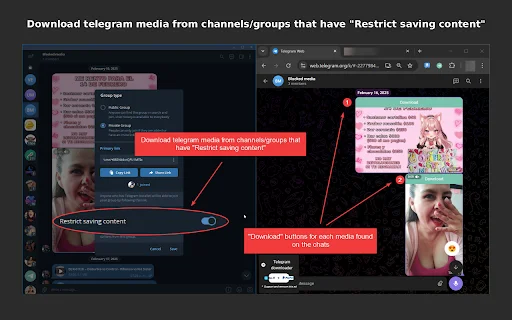
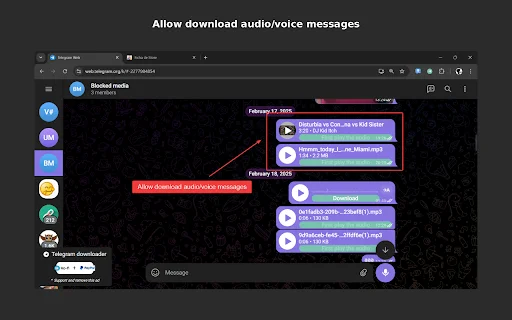
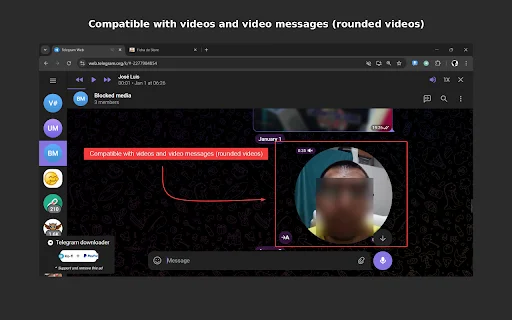
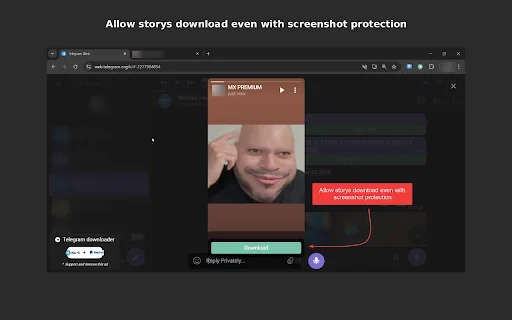
Are you tired of being unable to save important media or documents from Telegram groups and channels where content protection is enabled? Whether it is a crucial educational video, a shared image, or a text message you need to archive for later, the Telegram Downloader extension is your ultimate solution. Designed specifically for power users, this tool bypasses restrictive viewing settings, allowing you to regain control over the content you access daily.
For users across the United States looking to streamline their workflow, this browser extension is a game-changer. It eliminates the frustration of “content protected” warnings, ensuring that your media library remains fully accessible. By integrating seamlessly with the Telegram K version, it provides a stable and efficient way to store, organize, and manage your digital assets without compromising on speed or quality.
Key Features
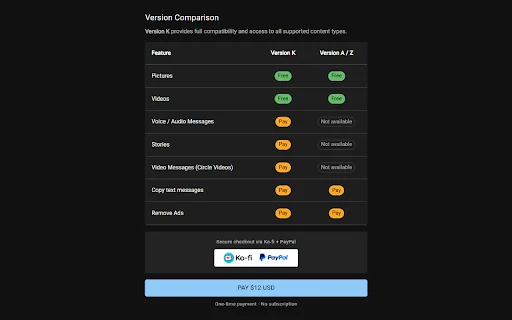
- Download protected pictures from groups and channels.
- Save high-quality videos directly to your local storage.
- Copy text messages to your clipboard with a single click.
- Retrieve and download voice and audio messages effortlessly.
- Capture round video messages (video notes) in their original format.
- Download Telegram Stories shared by your contacts.
- Optimized performance for the Telegram K web interface.
- User-friendly interface requiring no complex technical setup.
How to Use
- Install the Telegram Downloader extension from the browser store.
- Open Telegram Web (K version is highly recommended for full compatibility).
- Navigate to the group or channel containing the protected content.
- Click the extension icon or the integrated download button on the media file.
- Save the file directly to your desired folder on your computer.
FAQ
Is this extension compatible with all Telegram versions?
It is highly recommended to use the Telegram K version for the best experience and full access to all features, as other versions may have stricter security protocols.
Does this tool work on mobile devices?
No, this is a browser extension designed specifically for desktop web browsers to facilitate downloads from Telegram Web.
Can I download protected text messages?
Yes, the extension includes a feature to copy text messages directly to your clipboard for easy saving.
Is my data secure while using this extension?
We prioritize user privacy and the extension only interacts with the media you choose to download; it does not store your personal login credentials.
What should I do if a download fails?
Ensure you are using the Telegram K version and refresh the page. If the issue persists, verify that your browser has the necessary permissions to save files.
Don’t let content restrictions limit your productivity any longer. Take control of your media and ensure you never lose access to important shared files again. Install the Telegram Downloader extension today and experience seamless media management!
Users are highly satisfied with the extension, highlighting its efficiency and ease of use for downloading restricted content.
Kelebihan
- Works reliably
- Simple and effective
Ulasan Pengguna
Thanks to the author!
working fine
| ID Ekstensi | djioaghldnadjgnjnnnbmdflobjlcghf |
|---|---|
| Version | 2.0.0 |
| Size | 1.5 MB |
| Developer | https://programmer51.com |
| Terakhir Diperbarui | |
| Tanggal Rilis | |
| Jumlah Pengguna | 1.000++ |
| Jumlah Ulasan | 3 |
| Chrome Store Ranking | #30942 |
| Category | Productivity |
| Tipe | Paid |

xb ডাউনলোড করুন – Weibo-এর জন্য সেরা ক্লিন এবং অ্যাড-ফ্রি রিডিং এক্সটেনশন
nnecec

Scribr: Voice to Text ডাউনলোড করুন – সেরা অফলাইন ভয়েস ট্রান্সক্রিপশন
Flexkit

ACOS ডাউনলোড করুন – চার্চ পরিচালনার জন্য সেরা ডিজিটাল সমাধান
Horizon Hope Pro

Smodin AI Detector: আপনার লেখাকে করুন আরও নির্ভুল ও মানবিক
https://smodin.io

Chat2File ডাউনলোড করুন – AI চ্যাট সহজে Word, PDF ও Markdown-এ এক্সপোর্ট করুন
https://chat2file.top

Claude AI Width Enlarger ডাউনলোড করুন – চ্যাট উইন্ডো বড় করুন
Chrome Extension Developer