
Doubao Image Downloader – Save AI Art Without Watermarks
Cara Install Ekstensi Chrome
- Klik tombol "Add to Chrome" di atas.
- Anda akan diarahkan ke Chrome Web Store.
- Klik "Add to Chrome" pada halaman ekstensi.
- Konfirmasi dengan klik "Add Extension" pada popup.
- Ekstensi akan otomatis terpasang dan ikon muncul di toolbar.
- Klik ikon ekstensi di toolbar untuk mulai menggunakan.
Screenshot
Are you tired of dealing with annoying watermarks on your AI-generated artwork? If you use Doubao to create stunning visuals, you know how frustrating it is to manually save every single image while trying to maintain high quality. Doubao Image Downloader is the ultimate browser extension designed to streamline your creative workflow, allowing you to capture high-definition, watermark-free images with a single click.
Whether you are a digital artist, a social media manager, or just someone who loves experimenting with AI generation, this tool is a game-changer. By automating the extraction process, it saves you time and ensures your library is organized and pristine. Say goodbye to manual downloading and start building your collection of AI masterpieces effortlessly today.
Key Features
- Watermark-Free Downloads: Capture high-definition original images directly from Doubao without any branding overlays.
- One-Click Batch Saving: Select and download multiple images simultaneously, saving them directly to a dedicated local folder.
- Real-Time Auto-Detection: Automatically intercept and extract AI-generated image streams as they appear in your chat.
- Smart File Management: Includes a quick-open feature to instantly access your downloads folder after saving.
- Historical Sync: Seamlessly load and detect images from previous chat conversations as you switch between them.
- Intelligent Deduplication: Automatically identify and filter out duplicate images to keep your storage clean.
- 100% Privacy Focused: All processing occurs locally on your device; no data is sent to third-party servers.
How to Use
- Install the extension from the Chrome Web Store and navigate to doubao.com.
- Generate your AI images as usual within the Doubao interface.
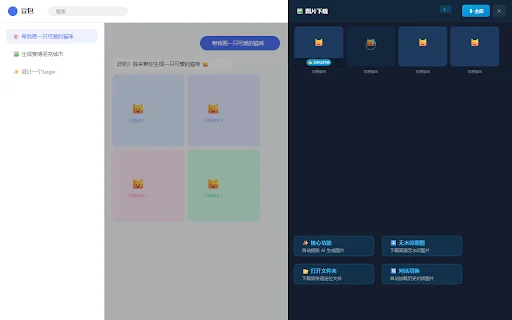
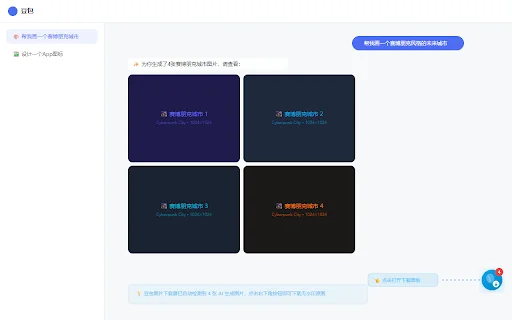
- Locate the floating button in the bottom right corner, which indicates the number of detected images.
- Click the button to open the download panel and choose to save individual items or download all at once.
FAQ
Is this extension free to use?
Yes, Doubao Image Downloader is completely free to install and use for your AI image collection needs.
Does this tool collect my personal data?
No, your privacy is our priority. All image processing is performed locally on your browser, and no data is shared with third parties.
Will this remove watermarks from all images?
The extension is specifically designed to intercept the original, high-definition assets provided by Doubao’s engine, effectively bypassing the platform’s watermark overlay.
Can I download images from old conversations?
Yes, the extension supports historical detection, meaning it will load and display images from your previous chat sessions.
Where are the images saved?
Images are saved to your local machine, typically organized within a dedicated “doubao/” folder for easy access.
Don’t let watermarks ruin your AI art. Join hundreds of satisfied users and upgrade your creative toolkit today. Install Doubao Image Downloader and take full control of your AI-generated assets!
Users appreciate the convenience of the extension for downloading AI images, though some suggest improvements in speed and interface functionality.
Kelebihan
- Simple and easy to use
- Effective for saving AI-generated content
Kekurangan
- Requires better response speed
- Lacks image navigation features
- Missing clipboard copy functionality
- Some users report detection issues
Ulasan Pengguna
It is very easy to use.
Great plugin. Some suggestions: 1. Improve response speed; it takes a while to detect new images. 2. Add left/right navigation for image details. 3. Add a copy-to-clipboard feature.
It does not work.
| ID Ekstensi | embiiekkhehgniohjfgecoaploefilbb |
|---|---|
| Version | 1.0.0 |
| Size | 0.0 MB |
| Developer | [email protected] |
| Terakhir Diperbarui | |
| Tanggal Rilis | |
| Jumlah Pengguna | 1.000++ |
| Jumlah Ulasan | 5 |
| Category | Productivity |
| Tipe | Free |

Innovision Smart Guard ডাউনলোড করুন – সেরা ERP সমাধান
Vigo Infotech Private Limited

Fillify – AI Form Filler ডাউনলোড করুন: যেকোনো ফর্ম পূরণ এখন সহজ
https://fillify.tech

UserTesting Browser Recorder ডাউনলোড করুন – ইউজার ফিডব্যাক দিন
UserTesting

FlowHCM ডাউনলোড করুন – ছোট ও বড় ব্যবসার সেরা HR সমাধান
FlowHCM
AI মিটিং ট্রান্সক্রিপশন অ্যাপ ডাউনলোড করুন – সেরা ভয়েস টু টেক্সট
KoyamaAtsushi
MS Office 365 Apps ডাউনলোড করুন – সেরা অফিস টুলস এক্সটেনশন
https://oubrecht.com/