
Docs to PDF – Batch Convert Google Docs & Word to PDF Easily
Cara Install Ekstensi Chrome
- Klik tombol "Add to Chrome" di atas.
- Anda akan diarahkan ke Chrome Web Store.
- Klik "Add to Chrome" pada halaman ekstensi.
- Konfirmasi dengan klik "Add Extension" pada popup.
- Ekstensi akan otomatis terpasang dan ikon muncul di toolbar.
- Klik ikon ekstensi di toolbar untuk mulai menggunakan.
Screenshot
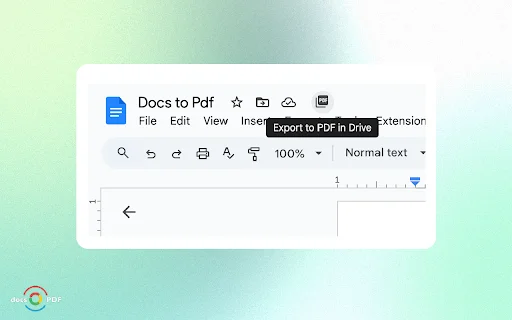
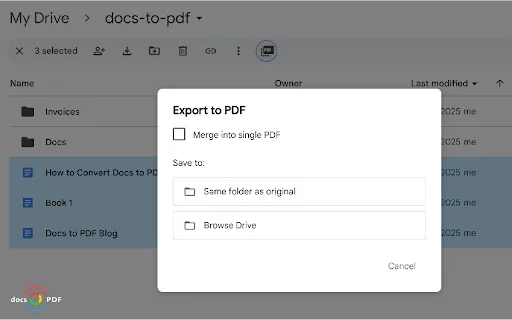
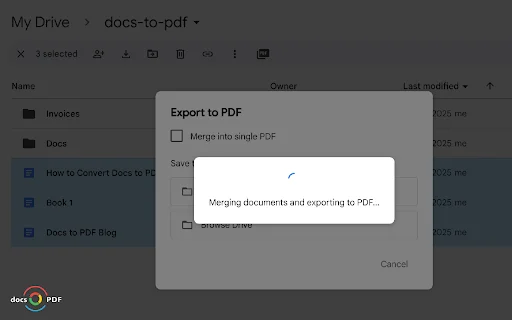
Are you tired of manually downloading, converting, and re-uploading documents to Google Drive? For busy professionals and educators in the U.S. who manage a high volume of paperwork, every minute counts. Docs to PDF is the ultimate Google Drive productivity tool designed to streamline your workflow by allowing you to convert multiple Google Docs and Word (.docx) files into professional-grade PDFs without ever leaving your browser.
Whether you are a project manager compiling monthly reports, a teacher organizing student handouts, or an administrative professional handling legal documents, this extension eliminates the tedious “back-and-forth” process. With secure processing that keeps your data within your own Google account, you can now manage your digital records with unprecedented speed and efficiency. Say goodbye to external software and hello to seamless document management directly where your files live.
Key Features
- Batch convert multiple Google Docs and Word files to PDF simultaneously.
- Merge multiple individual documents into a single, cohesive PDF file.
- Direct integration within Google Drive for a seamless user experience.
- Customizable destination folder selection for organized file storage.
- Enhanced security with optional password protection for exported PDFs.
- Zero installation of additional software or complex desktop applications required.
- Privacy-focused architecture: Your files are never stored or accessed by our servers.
- Flexible pricing tiers ranging from free trials to high-volume business plans.
How to Use
- Open your Google Drive and select the Google Docs or Word files you wish to convert.
- Right-click or use the extension menu to launch the Docs to PDF tool.
- Choose your preferred output settings, including merging options or password security.
- Select your destination folder in Google Drive and click “Convert.”
- Wait seconds as your files are processed and saved automatically to your chosen location.
FAQ
Is my data secure when using Docs to PDF?
Yes, your privacy is our priority. Everything runs through your own Google account, and we do not store, process, or access your documents.
Can I merge multiple files into one PDF?
Absolutely! The extension includes a powerful merge feature that allows you to combine multiple documents into a single, clean PDF file instantly.
Does this tool work with Microsoft Word (.docx) files?
Yes, Docs to PDF fully supports both native Google Docs and Microsoft Word (.docx) formats for conversion.
Is there a free version available?
Yes, you can start for free with 25 conversions to test the features and performance of the extension.
Do I need to install any external software on my computer?
No, Docs to PDF is a browser-based extension that operates entirely within Google Drive, requiring no separate software installations.
Stop wasting time on manual document formatting. Join hundreds of professionals who have optimized their document workflow with Docs to PDF. Install the extension today and experience the fastest way to manage your files in Google Drive!
The extension is highly regarded for its useful features and responsive customer support, making it a reliable tool for document conversion.
Kelebihan
- Useful features
- Reactive and helpful support
Ulasan Pengguna
Very useful features and reactive support
| ID Ekstensi | ddfhbmfbceegjhnemjjcneffnajdehal |
|---|---|
| Version | 1.24 |
| Size | 0.8 MB |
| Developer | https://docs-to-pdf.com |
| Terakhir Diperbarui | |
| Tanggal Rilis | |
| Jumlah Pengguna | 1.000++ |
| Jumlah Ulasan | 5 |
| Chrome Store Ranking | #22692 |
| Category | Productivity |
| Tipe | Paid |

ChatGPT Toolkit ডাউনলোড করুন – এআই প্রোডাক্টিভিটি টুল
http://blog.miniasp.com/

Qshot – Bullet Search ডাউনলোড করুন | দ্রুত এআই সার্চের জন্য সেরা এক্সটেনশন
https://qshot.top

Zone PDF ডাউনলোড করুন – সেরা PDF এডিটর ও কনভার্টার টুল
https://zonepdf.com

Voteezy ডাউনলোড করুন – দ্রুত এবং নিরাপদ ডিজিটাল ভোটিং প্ল্যাটফর্ম
JimahTech

Breakcold CRM ডাউনলোড করুন – LinkedIn সেলস ও অটোমেশন টুল
https://breakcold.com

Poscream ডাউনলোড করুন – ব্যবসা পরিচালনার সেরা সফটওয়্যার
Nugsoft Technologies Ltd