
Better GitHub: Optimize Your Workflow with Essential Features
shawn
Cara Install Ekstensi Chrome
- Klik tombol "Add to Chrome" di atas.
- Anda akan diarahkan ke Chrome Web Store.
- Klik "Add to Chrome" pada halaman ekstensi.
- Konfirmasi dengan klik "Add Extension" pada popup.
- Ekstensi akan otomatis terpasang dan ikon muncul di toolbar.
- Klik ikon ekstensi di toolbar untuk mulai menggunakan.
Screenshot
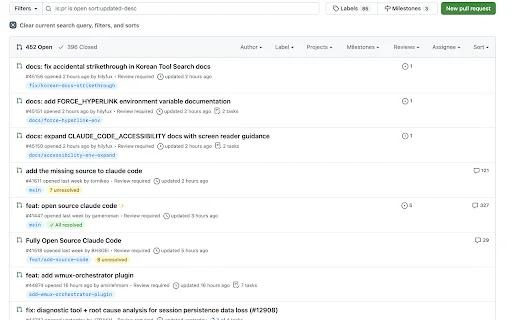
Are you a developer tired of the cluttered interface and missing workflow optimizations on GitHub? Navigating through endless pull requests and unorganized issue lists can be a significant drain on your productivity. Better GitHub is the lightweight browser extension designed to reclaim your time by injecting essential, high-impact features directly into your GitHub interface without the bloat found in other comprehensive tools.
For US-based software engineers and open-source contributors, Better GitHub offers a streamlined experience that emphasizes speed and clarity. By focusing on the most effective UI enhancements—such as improved PR branch visibility and intuitive file management—this extension ensures you spend less time clicking through menus and more time shipping high-quality code. It is privacy-first, open-source, and contains absolutely no tracking, ensuring your development environment remains secure and efficient.
Key Features
- PR Branch Names: Instantly view source branches next to PR titles with a one-click copy function.
- PR Review Status: Track resolution states directly from the pull request list view.
- PR Label Position: Move labels to the front of titles for better scanning and prioritization.
- PR Approve Now: Utilize a convenient shortcut to approve PRs directly from the sidebar.
- PR Collapse/Expand: Easily toggle file trees and diffs to focus on relevant code sections.
- Default Sort by Updated: Automatically sort PRs and issues by recent activity to stay current.
- Releases Tab: Seamlessly add a dedicated Releases tab to any repository navigation bar.
- Recent Commit Color: Visually identify code freshness using color-coded commit age indicators.
How to Use
- Install the Better GitHub extension from your browser’s web store.
- Click the extension icon to navigate to the settings dashboard.
- Provide your GitHub API token with ‘repo’ scope to enable advanced features.
- Toggle individual features on or off based on your personal workflow preferences.
- Refresh your GitHub pages to see the improvements immediately applied to your interface.
FAQ
Is Better GitHub safe to use with my private repositories?
Yes, Better GitHub is fully open-source and performs no tracking, analytics, or telemetry. All data stays strictly on your local machine.
Why do I need to provide a GitHub API token?
The API token is required for certain features that need to fetch specific metadata, such as review statuses, which are not always available on the static page HTML.
Can I customize which features are enabled?
Absolutely. You can toggle every feature individually via the extension settings page to keep your workspace exactly how you want it.
Does this extension slow down browser performance?
No, Better GitHub is designed to be lightweight and only injects the necessary code, ensuring your GitHub experience remains fast and responsive.
How does this differ from Refined GitHub?
While Refined GitHub is a massive suite of features, Better GitHub focuses on a curated set of truly effective and noticeable enhancements to prevent feature bloat.
Ready to transform your development workflow? Stop wasting time on clunky interfaces and start coding with better visibility and control. Install Better GitHub today and experience a cleaner, faster, and more efficient way to manage your repositories.
There are currently no user reviews available for Better GitHub.
| ID Ekstensi | annimelofpkbcphbdikipjlconehbnpb |
|---|---|
| Version | 1.8.0 |
| Size | 0.0 MB |
| Developer | shawn |
| Terakhir Diperbarui | |
| Tanggal Rilis | |
| Jumlah Pengguna | 1.000++ |
| Chrome Store Ranking | #32852 |
| Category | Developer |
| Tipe | Free |
Visual Python for Colab ডাউনলোড করুন – সেরা কোড জেনারেটর
blacklogic.dev

Validate Schema in Schema Markup Validator ডাউনলোড করুন – সেরা SEO টুল
Break The Web

Script Injector ডাউনলোড করুন – ব্রাউজারে কাস্টম স্ক্রিপ্ট রান করুন
Dorian Rouby

Open in Overleaf ডাউনলোড করুন – arXiv পেপার এডিট করুন সহজে
amitness

SEOMarkup Inspector ডাউনলোড করুন – JSON-LD স্ট্রাকচার্ড ডেটা এনালাইজার
reviewmysite.ai

Code Formatter ডাউনলোড করুন – HTML, CSS, JS ও JSON কোড সাজান
https://devutilx.com