

AI Bookmark Copilot: Organize & Clean Your Browser Bookmarks
Cara Install Ekstensi Chrome
- Klik tombol "Add to Chrome" di atas.
- Anda akan diarahkan ke Chrome Web Store.
- Klik "Add to Chrome" pada halaman ekstensi.
- Konfirmasi dengan klik "Add Extension" pada popup.
- Ekstensi akan otomatis terpasang dan ikon muncul di toolbar.
- Klik ikon ekstensi di toolbar untuk mulai menggunakan.
Screenshot
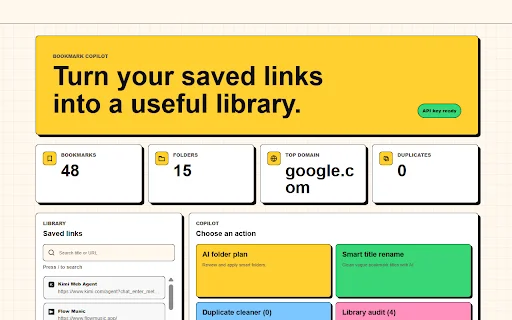
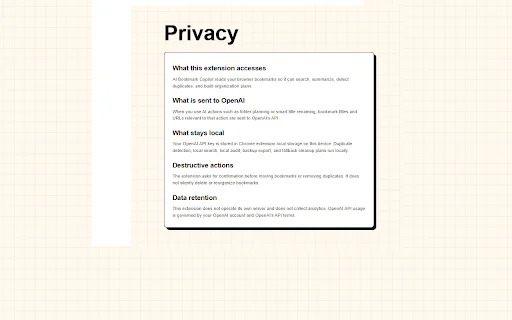
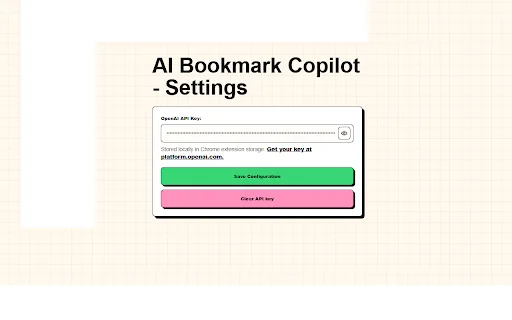
Are you tired of staring at a digital graveyard of hundreds of “Untitled” bookmarks? For many power users, the bookmark bar becomes a cluttered mess of broken links, duplicate entries, and vague titles that make finding your favorite resources impossible. If you are struggling to keep your research or daily workflow organized, AI Bookmark Copilot is the intelligent assistant you have been waiting for.
This extension bridges the gap between chaos and productivity. By leveraging the power of AI to categorize, rename, and clean your library, it transforms your browser into a streamlined tool for efficiency. Designed with a privacy-first approach, it ensures that your browsing habits remain confidential while giving you the automated control you need to reclaim your digital workspace.
Key Features
- AI-Powered Folder Planning: Automatically generate a logical, hierarchical folder structure based on your existing bookmarks.
- Smart Title Renaming: Use AI to rewrite vague or broken page titles into meaningful, descriptive labels.
- Contextual Search: Find exactly what you need by searching for the meaning and context behind a page, not just keywords.
- Duplicate Cleaner: Instantly identify and remove redundant URLs to keep your library lean.
- Library Audit Tool: Detect empty titles, insecure HTTP links, and overly long URLs in seconds.
- Dashboard Analytics: Visualize your library health with stats on folders, domains, and total entries.
- Privacy-First Architecture: Core tasks run locally on your device, and API keys are stored securely.
- Export Functionality: Easily backup your entire collection as JSON or CSV files.
How to Use
- Install the AI Bookmark Copilot extension from the Chrome Web Store.
- Open the extension dashboard to perform an initial library audit.
- Trigger the AI folder planner to suggest a new, organized hierarchy for your links.
- Review and confirm the changes to ensure everything is moved exactly where you want it.
- Use the AI search bar whenever you need to find a bookmark based on its content or context.
FAQ
Is my browsing data sent to external servers?
No, your browsing data and search history remain on your local device. AI processing is only triggered when you manually initiate a task.
Does this extension automatically delete my bookmarks?
No. Every action, including deletions or folder moves, requires your explicit confirmation. You remain in full control.
Can I backup my bookmarks using this tool?
Yes, you can export your entire bookmark library as a JSON or CSV file at any time.
What if I don’t want to use my own OpenAI API key?
The extension is designed to work with your own API key to ensure you only pay for what you use, with no hidden subscription costs or third-party data mining.
Does it work with existing browser folders?
Yes, it analyzes your existing structure and suggests improvements without breaking your current workflow.
Stop wasting time digging through cluttered folders. Download AI Bookmark Copilot today and experience a smarter, cleaner, and faster way to manage your web resources.
Users appreciate the extension's ability to quickly organize messy bookmark folders and provide descriptive titles, though some have reported occasional technical errors.
Kelebihan
- Efficiently organizes cluttered bookmark folders
- Clever use of AI for renaming vague links
- Great for users with large collections
Kekurangan
- Occasional technical errors during model processing
Ulasan Pengguna
Great application based on good ideas. If you have many bookmarks and are too lazy to organize them, or can't recognize what is what because of the names, this will help you. Everything organized, summarized, and with descriptive names in a short time; it saved me hours of work.
Great extension, if you want to organize your messy Bookmark folder, would recommend for people that use the Bookmark feature a lot.
Errors for both models. Didn't work.
| ID Ekstensi | kjgocijahkdijnllhoeiidgjmglblelb |
|---|---|
| Version | 16.0.0 |
| Size | 0.5 MB |
| Developer | [email protected] |
| Terakhir Diperbarui | |
| Tanggal Rilis | |
| Jumlah Pengguna | 1.000++ |
| Jumlah Ulasan | 6 |
| Chrome Store Ranking | #29365 |
| Category | Productivity |
| Tipe | Free |

Smodin AI Detector: আপনার লেখাকে করুন আরও নির্ভুল ও মানবিক
https://smodin.io
PDF Compressor ডাউনলোড করুন – পিডিএফ সাইজ কমান ১ এমবি-র নিচে
Mansu Tech

YouTube Tracker ডাউনলোড করুন – আপনার ইউটিউব দেখার সময় ট্র্যাক করুন
Rakambda

Ninho Residencial ডাউনলোড করুন – কন্ডোমিনিয়াম ম্যানেজমেন্ট অ্যাপ
Wagner Fernandes

GMB Audit ডাউনলোড করুন – লোকাল SEO এবং Google রিভিউ টুল
https://getgmbaudit.com

Egyptair CACS ডাউনলোড করুন – ক্রু অটোমেটিক চেক-ইন সিস্টেম
Ahmed Gooda